

Loud Keyboard Etiquette
Do you have a right to write loudly?

Don’t Type So Close to Me

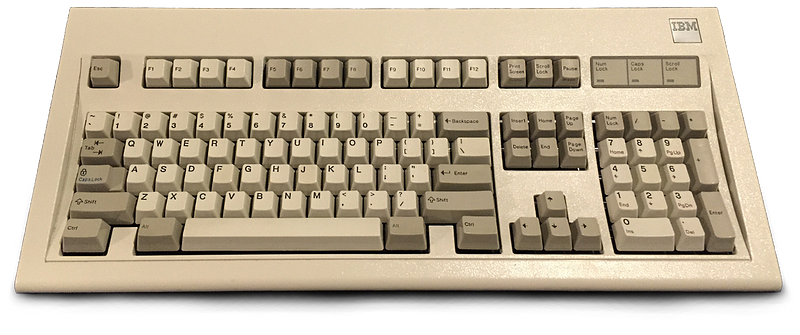
My first programming job was creating a database on a 1986 IBM PC — the early personal computer that used the famous (in some circles), industrial, loud-as-hell Model M keyboard.
In an office filled with even-louder IBM Selectric typewriters, the clacky IBM PC keyboard fit right in. But this type of keyboard isn’t standard equipment anymore, and for good reason.
First, it was over-engineered and expensive. Today, most desktop computers and laptops ship with cheap “rubber dome” keyboards, in which a shallow key button presses down on little plastic dimple in a membrane under the keys, which touches down on a circuit board to make a connection. It’s a popular design because it’s super cheap. And some are not too bad to use. A lot of the world’s keyboarding is done on membrane keyboards.
Second, as I said, mechanical keyboard switches, like the kind in the Model M, can be loud — wake-the-baby loud, disrupt-the-Zoom-call loud.
So why haven’t these loud, clacky, mechanical keyboards died off entirely? Because people like them. Many (like me) find them more enjoyable to type on. The keys are heftier and travel farther, and it can be easier to get into a typing groove with them.
But that noise. If you got one of these comfortable but loud keyboards for the laptop in your COVID home office, and you’re planning to go back to the real office, you might be thinking you have to leave your keyboard at home, unless your goal is performative typing.
Is it ever ok, actually, to use a mechanical keyboard in a world in which other people exist? Can you use it at home? And, when you return to the office, can you take it with you and use it there?
You can, maybe. If you follow one or more of these etiquette guidelines.
Try a mat
Putting a layer of rubber or neoprene between your desk and the keyboard will prevent your furniture from amplifying the keyboard’s sound. It helps a little. Here’s a basic one from Amazon.
Strangle your keycaps
You can put little shock-absorbing o-rings into the keys themselves. This means pulling off the keyboard buttons one by one and sticking a little rubber grommet into the backside of each one. It’s not that hard to, and it does quiet things down. You have to make sure this method will work with your particular keyboard. It also changes the feel of the keys — how much depends on which type of switches your keyboard uses.
Get a quieter keyboard
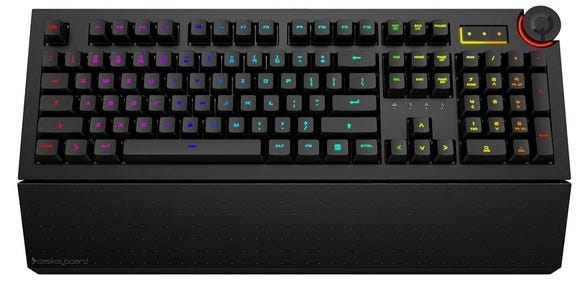
Not all mechanical keyboards are clicky. Some are more subtle, and use a different kind of switch that doesn’t make each keypress sound like a rifle shot. You can look for keyboards made with Cherry MX Brown key switches for a good compromise between feel and volume. They still feel great, but they don’t clack like an old IBM Model M. On the other hand, if you want everyone within a mile to know when you’re typing, check out keyboards with Cherry MX Blue switches. Those are popcorn poppers.
Personally, I’m a fan of Das Keyboard’s products. I’ve bought a few over the years and am currently experimenting with a light-up Das Keyboard 5QS (sent to me by the company to try out), which feels great and has a mostly office-friendly typing sound, although not as quiet as the typical membrane keyboard on a laptop.
Software to the rescue!
For video calls, you can get software that will magically remove the keyboard clacking sound from being transmitted to the rest of the people in the meeting. This software can also cut down other background noise. You’ll still hear these noises, but other people on the call will not. It is a good solution if you work at home alone and like a clicky keyboard.
For example, try Krisp. Also, the major videoconferencing apps, like Zoom, Webex, and Microsoft Teams, are adding some noise-reduction features, so you might already have this technology in the app you currently use.
Sadly, software won’t help the people sitting right next to you. And yes, it is rude to hand out earplugs so your typing doesn’t bother them.
Keyboards should be seen and not heard
In summary, if you want to use a loud keyboard where other people can hear it, tech etiquette dictates that you make an effort to quiet the thing down.
This article contains affiliate links (which is an experiment for me), so when you buy or try a product by clicking on a product link in this story, I may earn a commission. My editorial judgment is not affected by these arrangements.